
One-Click Generation
After the project is created, you need to add a development task and execute it. XDevelop will automatically complete code generation through AI.
Execution Steps
Figure: Add task and execute
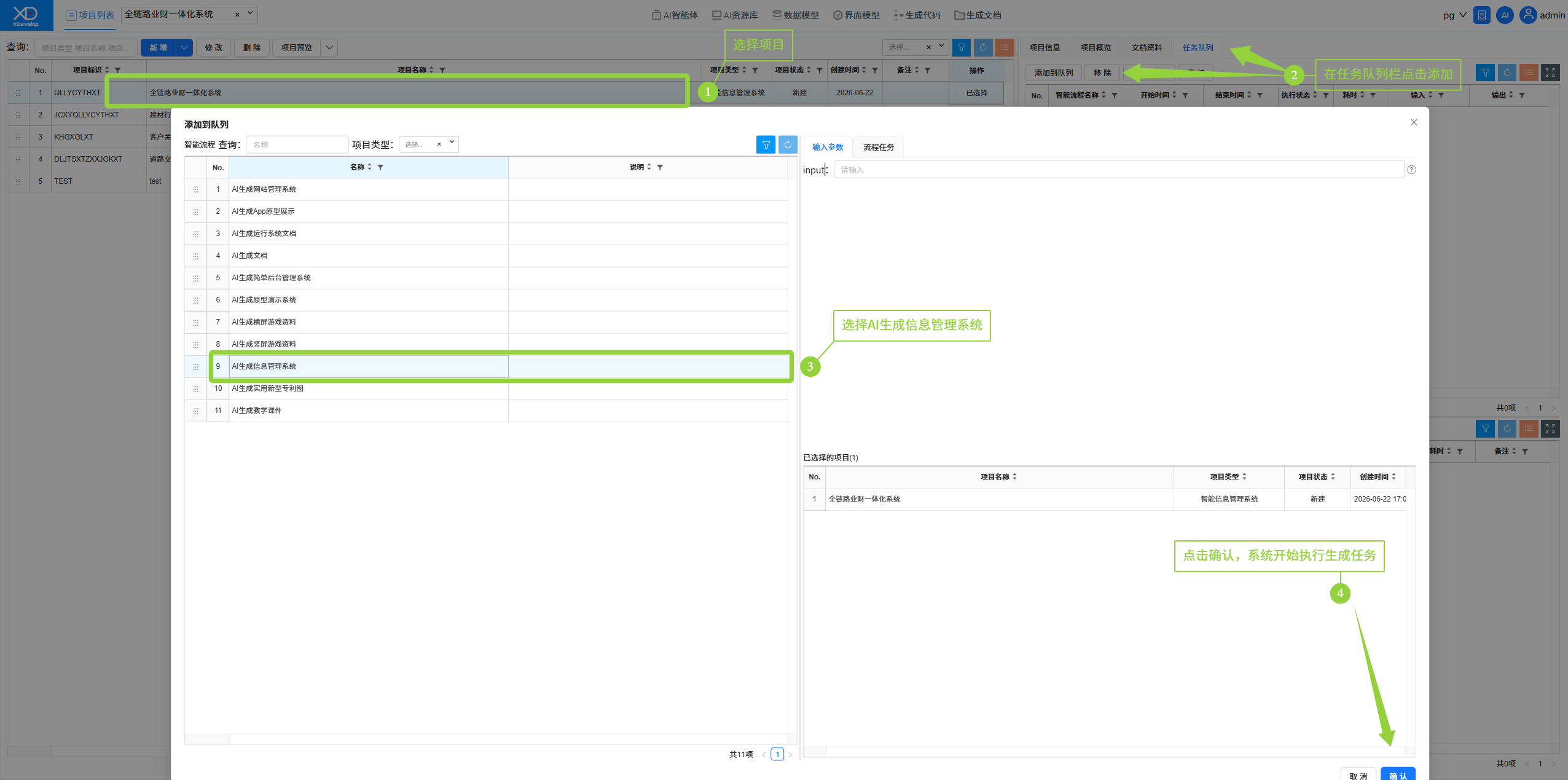
1. On the project list page, in the task queue bar, click the "Add to Queue" button.
2. Select the correct workflow (AI Generate Smart Information Management System).
3. After confirming the task content, click "Confirm" to start AI-powered automatic development.
4. The system will display the task execution progress. Please wait for the task to complete.
Generation Process
The AI generation process includes 6 main stages:
- Feature Description — Analyze requirements and organize functional modules
- Data Model & Fields — Design database table structures
- Functional Menus — Generate the UI navigation structure
- Code Definition — Establish coding standards and constraints
- Backend Code — Generate server-side business logic
- Frontend Code — Generate user interface pages
Please maintain a stable network connection during the generation process. The generation time depends on project complexity — a simple system takes approximately 3-5 minutes.
View Progress
During task execution, you can:
- View real-time execution logs
- View the generation results of each sub-agent
- In case of errors, view error details and retry