
Build & Run
After the backend generation task is complete, you need to compile and run the project.
Execution Steps
Figure: Build and run project
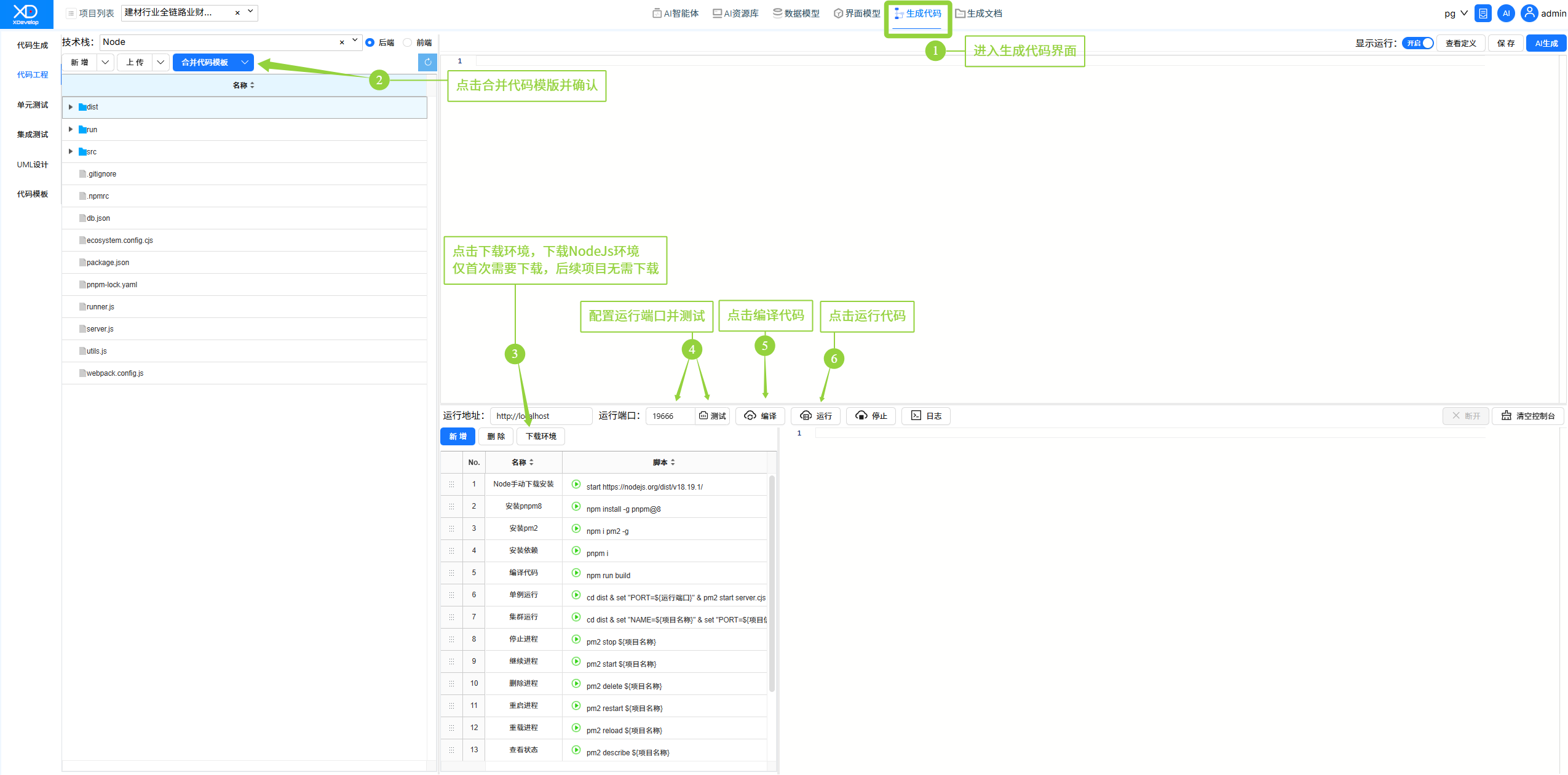
1. On the code generation screen, go to the "Code Project" tab.
2. For the first run of the project, click the "Merge Code Template" button and confirm to set up the project scaffolding.
3. After the project merge is complete, download the environment (first time only), then find an available port and click the "Build" button to compile the project.
4. After a successful build, click the "Run" button to start the project's local backend service.
5. To stop the backend service, click the "Stop" button.
- "Download Environment" only needs to be performed once per computer. After a successful download, subsequent projects do not need to repeat this step.
- "Merge Code Template" must be performed after the initial generation of each project.
FAQ
Missing Dependencies
The system will automatically detect and install required dependencies. Please ensure the network connection is working properly.
Port Already in Use
Modify the running port number in the "Code Project" settings, or close the program occupying the port.
Insufficient Memory
Close other large applications to free up memory, or restart the client and try again.