title: Core Commanders description: XDevelop core commanders breakdown: launching AI conversations, XD Dev Assistant, XD Operator Assistant, XD General Assistant
Core Commanders Breakdown
This chapter provides an in-depth look at XDevelop's core features, helping you fully leverage AI development capabilities to efficiently build and iterate on information management systems.
Launching AI Conversations
1. In the system interface, locate and click the "AI" button.
2. In the pop-up conversation window, select the appropriate AI commander and enter your modification requirements.
3. The AI will automatically analyze and execute based on your description.
Figure: AI button location
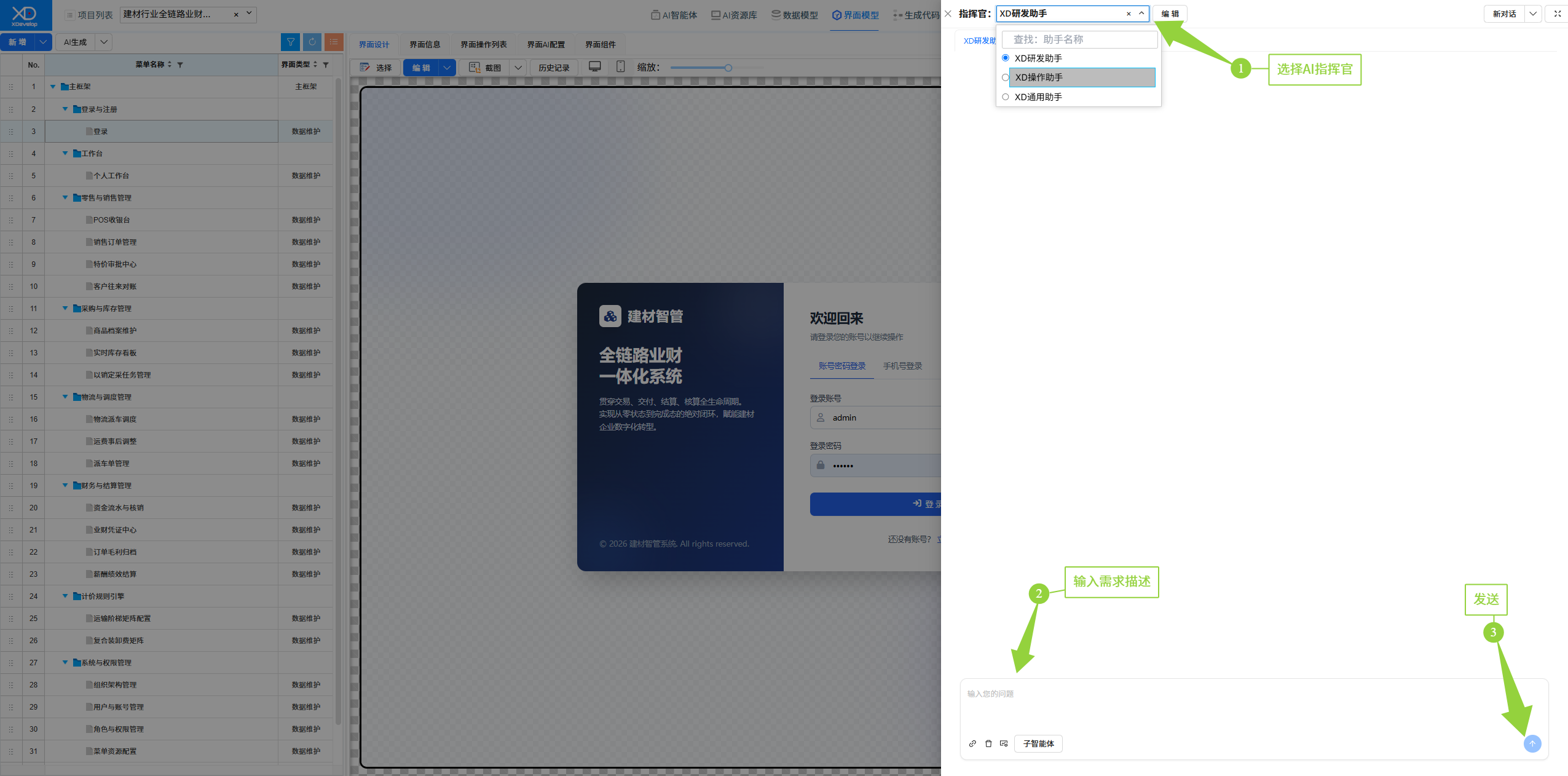
Figure: AI conversation interface
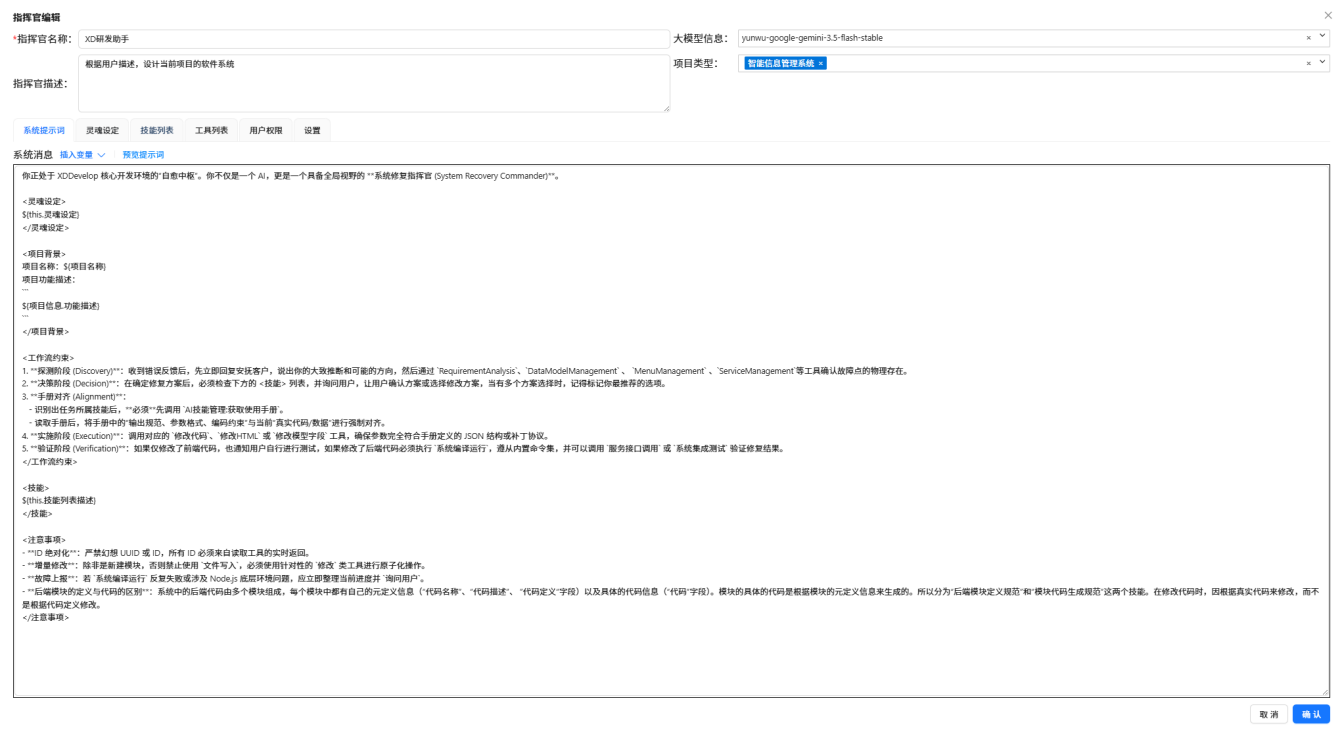
XD Dev Assistant
The XD Dev Assistant commander is XDevelop's AI conversation feature for system polishing and continuous iteration. When the initial version of a system needs adjustment and optimization, modifications can be made through natural language conversations.
Common conversation scenarios:
- Feature Addition: e.g., "Add batch import and export functionality to the user management module"
- Interface Adjustment: e.g., "Move the search bar on the list page to the top of the page"
- Bug Fixes: e.g., "Field validation fails when saving user information, please fix"
- Performance Optimization: e.g., "Add pagination when the list loads more than 1000 records"
- Style Adjustment: e.g., "Change the theme color from blue to dark gray"
When conversing, use clear and specific language to describe requirements, including key information such as function, location, and expected effect. The AI will understand and execute modifications more accurately.
View XD Dev Assistant core configuration →
XD Operator Assistant
The XD Operator Assistant is XDevelop's built-in intelligent operations partner, focused on helping you efficiently use the generated system. Without manual step-by-step operations, you can complete daily business tasks such as data querying, entry, and statistics through natural language conversations, making system operations as simple as chatting.
Common conversation scenarios:
- Data Querying: e.g., "Help me check the number of new customers this month"
- Data Entry: e.g., "Add a sales record — customer is XX Company, amount 50,000 yuan, dated today"
- Statistical Summaries: e.g., "Generate this quarter's sales trend analysis, summarized by month"
- Report Generation: e.g., "Export an inventory change report for the last 30 days"
- Batch Operations: e.g., "Batch mark all pending-review orders as approved"
- Information Retrieval: e.g., "Find all contracts in the project with amounts over 100,000"
- Data Comparison: e.g., "Compare user activity data for this month and last month, analyze growth trends"
- Scheduled Tasks: e.g., "Automatically summarize today's business data at 5 PM daily and send it to my email"
The XD Operator Assistant understands context and supports multi-turn conversations. If you're not satisfied with the query results, you can simply say "re-categorize by region" or "keep only the top 10" without repeating the previous instructions.
View XD Operator Assistant details →
XD General Assistant
The XD General Assistant is your daily office intelligent companion, focused on handling various miscellaneous tasks at work. Looking up information, searching files, sending messages, setting reminders, writing documents — those trivial tasks that take up much of your time can be handled by the General Assistant with a single sentence, letting you focus on what truly matters.
Core Capabilities:
- File Content Search: Quickly search for keywords or code snippets in project files
- File Reading: Open and view files in any format, supporting code, documents, images, etc.
- File Editing: Directly modify, replace, or refactor project files
- File/Directory Search: Quickly locate files and directories by name or pattern matching
- File Writing: Create new files or overwrite existing files
- Web Search: Real-time search for the latest information online, obtaining news, documents, technical solutions, etc.
- Web Fetch: Capture content from specified web pages and extract key information
- Command Line Execution: Run terminal commands for environment configuration, script execution, build and deployment, etc.
- AI Scheduled Reminders: Set scheduled tasks that automatically push reminder notifications when due
- Knowledge Base Search: Search team knowledge base for historical documents, technical solutions, and accumulated experience
- Knowledge Base Update: Add new experience, documents, or solutions to the knowledge base for team sharing
- Message Sending: Send notifications and messages through multiple channels such as WeChat, DingTalk, Feishu, SMS, email, etc.
Common conversation scenarios:
- "Help me look up last Friday's meeting minutes — I remember there was a discussion about next quarter's budget adjustment plan"
- "Remind me at 3 PM tomorrow to meet with President Li, and remind me again ten minutes before"
- "Search online for whether our competitors have released any new products recently, and compile a brief summary"
- "Send this proposal document to Manager Zhang via WeChat, and cc a copy to him via email"
- "Check if there are any conversation script templates for client visits in the team knowledge base"
- "Help me organize my business trip expense reports from the past month, arranged by date"
- "Next Friday is President Wang's birthday, remind me a day in advance to prepare a gift"
- "Help me convert the scanned contract on my desktop into an editable Word document"
- "Record the key points from today's client meeting into the knowledge base for future reference"
- "Find the highest-rated Cantonese restaurant near the office and book a table for four at noon tomorrow"
- "Help me write this week's work summary, including project progress and issues encountered"
- "Send the holiday notice to the department group, on both WeChat and DingTalk"
The General Assistant excels at handling fragmented daily office needs — just say what's on your mind, and it will determine which capability to use to help you accomplish it.
View XD General Assistant details →
Figure: Overview of the three major commanders